HEX, RGB and HSL Color Codes Explained
How screens mix red, green and blue, how to read a HEX code by hand, and when HSL or HSV is the easier way to pick and adjust colors.

The same shade of blue can be written as #4f46e5, rgb(79, 70, 229), hsl(243, 75%, 59%) or hsv(243, 69%, 90%). Designers, developers and printers pass colors around in all of these forms, and each one exists for a reason. This guide explains how the common color codes work, how to read them at a glance and which one to reach for when.
How screens make color
Every pixel on a screen is made of three tiny lights: red, green and blue. Mixing them at different strengths produces every color you see. Full red plus full green gives yellow, all three at full strength give white, and all three off give black. This is called additive color, because light is added together. Paint and printer ink work the other way round (subtractive), which is one reason a color on screen rarely matches its printed version exactly.
Most color codes on the web describe how strongly to light those three channels, either directly (RGB and HEX) or in a more human way (HSL and HSV).
RGB: three numbers from 0 to 255
RGB gives each channel a value from 0 to 255. That range comes from one byte per channel: 8 bits can store 256 different values. With three channels, a screen can show 256 × 256 × 256 = 16,777,216 colors.
- rgb(255, 0, 0) is pure red.
- rgb(128, 128, 128) is a middle gray, because all channels are equal.
- rgb(79, 70, 229) is an indigo: lots of blue, a little red and green.
RGB is precise, but it is hard to adjust by feel. If you want "the same blue, but a bit darker", it is not obvious which numbers to change.
HEX: RGB written in base 16
A HEX code is exactly the same three numbers, written in hexadecimal (base 16) and glued together. Hexadecimal digits run 0–9 and then a–f, so each pair of digits covers 00 to ff, which is 0 to 255.
Worked example: decoding #4f46e5
- Split it into pairs: 4f, 46, e5.
- Convert each pair: 4f = 4 × 16 + 15 = 79; 46 = 4 × 16 + 6 = 70; e5 = 14 × 16 + 5 = 229.
- So #4f46e5 is rgb(79, 70, 229).
A few shortcuts help you read HEX codes quickly:
- Three-digit codes double each digit: #f0a is #ff00aa.
- Equal pairs mean gray: #808080 is a mid gray, #333333 a dark charcoal.
- Eight-digit codes add an alpha (transparency) pair: #4f46e580 is the same indigo at 80 out of ff, about 50% opacity.
HEX is compact and easy to copy, which is why design tools and CSS files use it so widely.
HSL: hue, saturation and lightness
HSL describes a color the way people talk about it.
- Hue is the position on the color wheel, in degrees: 0° red, 120° green, 240° blue, and everything in between. 30° is orange, 210° a sky blue.
- Saturation is how vivid the color is, from 0% (gray) to 100% (fully intense).
- Lightness runs from 0% (black) through 50% (the pure color) to 100% (white).
Converting our indigo gives hsl(243.4, 75.4%, 58.6%). The power of HSL is that you can now change one thing at a time. Keep hue and saturation, lower lightness, and you get darker versions of exactly the same indigo, which is how many design systems build their color scales.
HSV (HSB): hue, saturation and value
HSV, also called HSB, uses the same hue wheel but replaces lightness with value (brightness). At 100% value you get the brightest version of the color; white needs value 100% and saturation 0%. Our indigo is hsv(243.4, 69.4%, 89.8%).
Many color pickers in design and photo apps use HSV: the square shows saturation left to right and value top to bottom, while a slider picks the hue. HSL is more common in CSS. Neither is "better"; they just slice the same color space differently.
Lightness and contrast
Changing lightness has a direct effect on readability. The chart shows the contrast ratio against white text for the same hue (243°) and saturation (75%) at different lightness levels. WCAG asks for at least 4.5:1 for normal text, so white text works on the 30%, 40%, 50% and 60% versions but not on the 70% one.
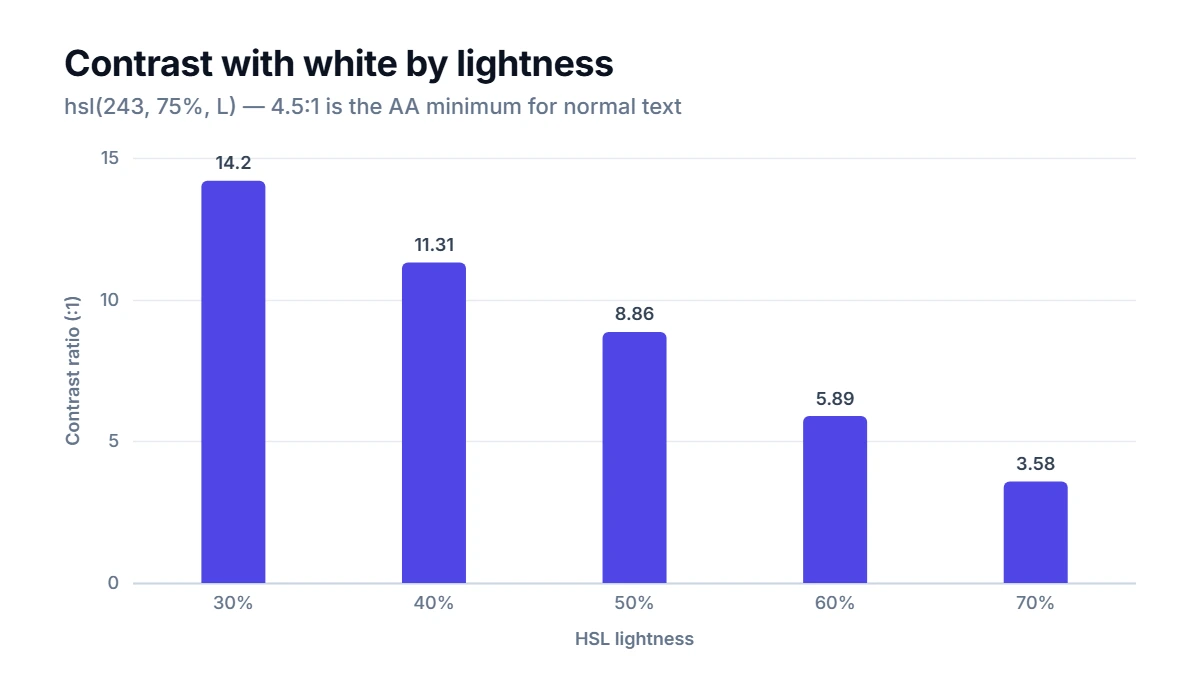
Be careful: lightness in HSL is not the same as perceived brightness. A yellow and a blue at the same HSL lightness look very different, because our eyes are much more sensitive to green and yellow light. That is why contrast checks use a separate formula, relative luminance, rather than HSL lightness.
How to use the converter
The Color Converter keeps HEX, RGB, HSL and HSV in sync. Edit any field, or use the picker, and all the others update as you type. Set the alpha from 0 to 1 for transparent colors. The result card shows a preview with white and black sample text, ready-to-copy CSS values, and the contrast ratio against white and black. The details card lists each WCAG level as pass or fail.
Common mistakes
- Mixing up the channel order. HEX and RGB are always red, green, blue. #00ff00 is green, not blue.
- Expecting HSL lightness to match how bright a color looks. It does not; check the contrast instead.
- Assuming exact round trips. RGB values must be whole numbers, so a color typed in HSL may shift by a fraction when it is rounded to RGB and back. The difference is invisible.
- Forgetting transparency. A 50% transparent color looks different on a white page and on a dark one. The converter blends it with each background before checking contrast.
- Using screen codes for print. Printers work in CMYK ink. Ask your print shop how they want colors specified, and check a printed proof.
FAQ
Why does HEX use letters?
Hexadecimal needs 16 digits, and there are only ten numerals. The letters a to f stand for the values 10 to 15. Upper and lower case mean the same thing, so #4F46E5 and #4f46e5 are identical.
Which color format should I use in CSS?
All modern browsers support HEX, rgb() and hsl(), so pick the one that is easiest to maintain. HEX is short and common in design handoffs. HSL is handy when you want to create lighter or darker variants by changing one number.
How many colors can a HEX code describe?
A six-digit HEX code has 16,777,216 possible values, the same as 8-bit RGB. With an alpha pair, each of those can also have 256 levels of transparency.
Why do two different color pickers give slightly different HEX codes for the same pixel?
Screens, images and apps may use different color profiles, and some pickers sample an average of nearby pixels. Small differences of one or two steps per channel are normal and usually invisible.