How QR Codes Work and How to Make One That Scans
A QR code is a grid of black and white squares that holds a link, text or Wi-Fi login and still works when part of it is damaged. Learn what the patterns mean, how size and error correction interact and how to print one that scans every time.

QR codes are everywhere: on restaurant tables, parcels, posters, tickets and the back of a router. Point a phone camera at one and a link or a Wi-Fi prompt pops up a moment later. Behind that speed is a clever design that lets a cheap camera read the code at an angle, in poor light and even with a chunk missing. Knowing a little about how it works helps you make codes that scan on the first try.
What is inside the square
A QR code is a grid of small squares called modules. Each module is dark or light, which stores one bit. But not every module is data. Several fixed patterns help the scanner find and straighten the code:
- Finder patterns: the three large squares in the corners. Their 1 : 1 : 3 : 1 : 1 ratio of dark and light is easy to spot from any angle, and they tell the scanner where the code is and which way up it sits.
- Timing patterns: two lines of alternating modules between the finder patterns. They tell the scanner how big each module is.
- Alignment patterns: smaller squares that appear in larger codes and help correct for a bent or tilted surface.
- Format information: a few modules next to the finder patterns that record the error correction level and the mask pattern used.
- Quiet zone: the plain light border around the code, ideally four modules wide. It is part of the design, not decoration.
Everything else holds your content plus extra error correction data.
Versions: why some codes are denser
QR codes come in 40 sizes called versions. Version 1 is 21 × 21 modules, and each version adds 4 modules per side, up to 177 × 177 for version 40. A generator picks the smallest version that fits your content and error correction level.
More content means more modules. Using the same library the QR Code Generator uses, a 20-character text fits in 25 × 25 modules at level L and 29 × 29 at level H. At 200 characters the code grows to 53 × 53 at level L and 77 × 77 at level H, and 1,000 characters need 105 × 105 or 161 × 161.
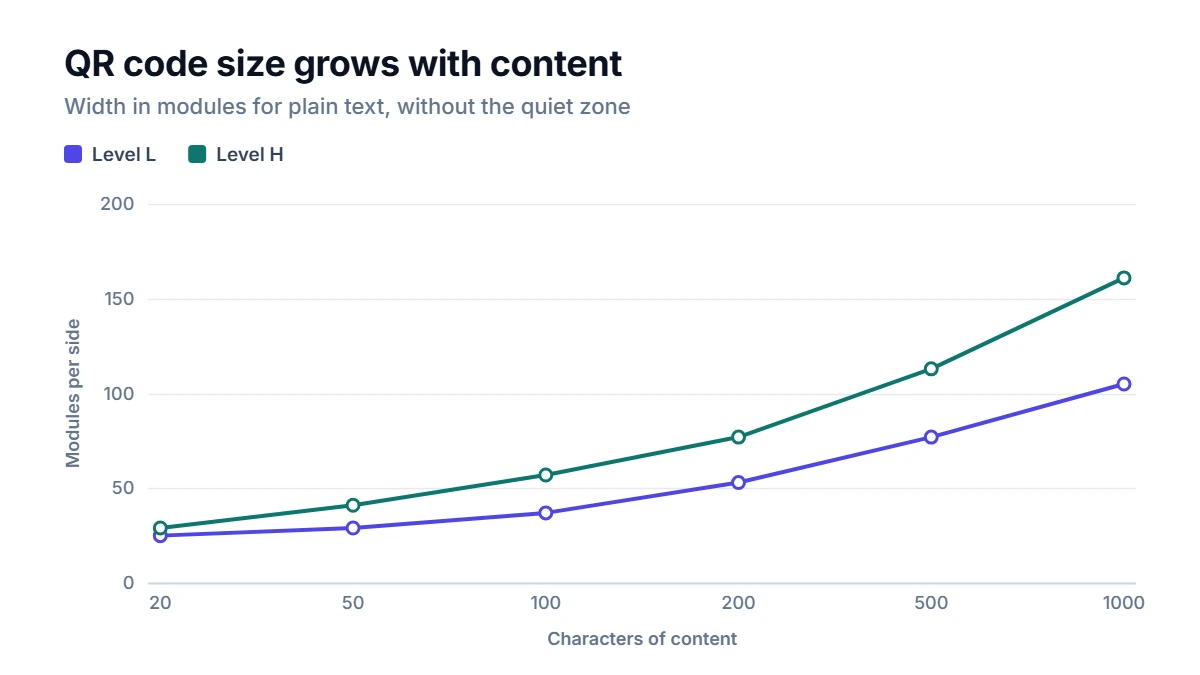
A denser code has smaller modules at the same printed size, and small modules are harder for a camera to resolve. That is the main reason short content scans more reliably.
Error correction: surviving damage
QR codes use Reed–Solomon error correction, the same family of math used on CDs and in data transmission. Extra codewords are added so that a scanner can rebuild missing or misread parts. There are four levels:
- L recovers roughly 7% of the data
- M roughly 15%
- Q roughly 25%
- H roughly 30%
Higher levels make the code more robust but larger. This is also why some codes have a logo in the middle: the logo destroys some modules, and error correction fills them back in. If you plan to cover part of a code, use level H and test carefully.
Worked example: a Wi-Fi code and a menu link
A guest Wi-Fi network called CafeGuest with the password sunny-window-42 becomes the text WIFI:T:WPA;S:CafeGuest;P:sunny-window-42;;, which is 42 bytes. At level M it fits in version 3, a grid of 29 × 29 modules. With a four-module quiet zone on each side the image is 37 modules wide, so a 1,024-pixel image uses 27 pixels per module and comes out at 999 × 999 pixels. Whole pixels per module keep the edges sharp.
Now compare two links to the same menu. A short address like https://example.com needs only 25 × 25 modules. The same page with tracking parameters added, 93 characters long, needs 41 × 41 modules at level M and 53 × 53 at level H. Printed at the same size, quiet zone included, the long-link code at level M has modules about a third narrower, and at level H almost half as wide. If you can, use a short, clean address.
How big to print a QR code
A common rule of thumb is that the code should be at least one tenth of the scanning distance. A table card read from about 30 cm away works at 3 cm or more; a poster read from 3 meters needs roughly 30 cm. Dense codes need more room than this rule suggests, so test at the real distance before printing a large batch.
Other tips that make a difference:
- Keep strong contrast: dark modules on a light background. Inverted or pastel codes fail on some phones.
- Leave the quiet zone clear of text, borders and patterns.
- Avoid shiny laminates that reflect light, and curved surfaces with small codes.
- Download SVG for print so the code stays sharp at any size; use PNG for screens and documents.
How to use the generator
Choose what the QR Code Generator should hold, a link or text, Wi-Fi details, an email or a phone number, and fill in the fields. Pick an error correction level, M for most uses, Q or H if the code may get scratched or partly covered. Generate the code, then scan the preview with two different phones before you download it. Everything is created in your browser, so a Wi-Fi password never leaves your device.
Static and dynamic codes
The codes made here are static: the content itself is stored in the pattern, so they never expire and do not depend on any service. Some paid services offer dynamic codes, which point to a short redirect link that can be changed later and can count scans. The trade-off is that a dynamic code stops working if that service closes or your subscription ends.
QR Code is a registered trademark of DENSO WAVE INCORPORATED.
FAQ
Can a QR code hold a whole document?
Only a short one. The largest code holds up to about 2,950 bytes at level L, which is a few pages of plain text at most and far less with accented characters. In practice, it is better to put the document online and encode a link to it.
Why does my QR code not scan?
The usual causes are low contrast, a missing quiet zone, a code printed too small for its density, glare from a glossy surface or a link with a typo. Test the code before printing, and if it is dense, shorten the content or print it larger.
Are QR codes safe to scan?
The code itself only contains text, but that text can be a link to any website. Check the address your phone shows before opening it, especially for codes stuck on parking meters or posters in public places, where someone may have placed a fake code over the real one.
Can I change what a static QR code points to?
No. The content is part of the pattern, so changing it means making a new code. If you expect the destination to change, point the code at a page on your own website that you can update later.