How to Count Words and Estimate Reading Time
Why do word counters disagree, and how long will your text take to read or say aloud? Learn what counts as a word, how reading time is worked out and how to plan a talk.

Word counts decide a surprising number of things: whether an essay meets the assignment, whether a cover letter fits on one page, how long a talk will run and how long readers will spend on a blog post. Counting sounds trivial, but different tools often disagree by a few words, and turning a word count into minutes takes a little care. This guide explains what actually counts as a word, why the numbers vary, and how to plan reading and speaking time.
What counts as a word
Most people would say a word is anything between two spaces. Real text is messier. Here are the cases that cause most of the disagreement between tools:
- Contractions such as "didn't" and "you're" are almost always counted as one word.
- Hyphenated words like "well-known" or "long-term" are counted as one word by some programs and two by others.
- Numbers such as 4.5 or 2026 usually count as one word each, and symbols like % or & on their own usually do not count.
- Dashes and slashes joining words without spaces, as in "and/or", can make two words look like one.
- Web addresses and email addresses can count as one word or be split into several pieces, depending on the tool.
None of these rules is right or wrong. What matters is to use the same counter from the first draft to the final version, and to check which tool your teacher, editor or publisher uses if a limit is strict.
A worked example
Take this short status update, written as two lines:
Our team didn't hit the Q3 target. Sales rose 4.5% but costs rose faster.
Next steps: cut well-known waste, review vendor contracts, and report back by Friday!
The Word Counter reports:
- Words: 28
- Characters: 159, including spaces and the line break
- Characters without spaces: 133
- Sentences: 3
- Paragraphs: 2
- Reading time: about 7 seconds
How did it get 28? "didn't" counts once, "Q3" and "4.5" each count as one word, and "well-known" counts as two words, "well" and "known". A word processor that treats hyphenated words as single words would report 27. A one-word difference is harmless here, but in a 5,000-word report full of terms like "year-on-year" and "data-driven", the gap can reach dozens of words.
The sentence count is 3 because the line break after "faster." starts a new paragraph, and the second line ends with an exclamation mark. Headings and list items without a final full stop still count as sentences when they sit on their own line.
Turning words into reading time
Reading time is simply the word count divided by a reading speed. The Word Counter uses 238 words per minute, a commonly cited average for adults reading non-fiction silently. Speaking time uses 130 words per minute, a comfortable pace for a presentation.
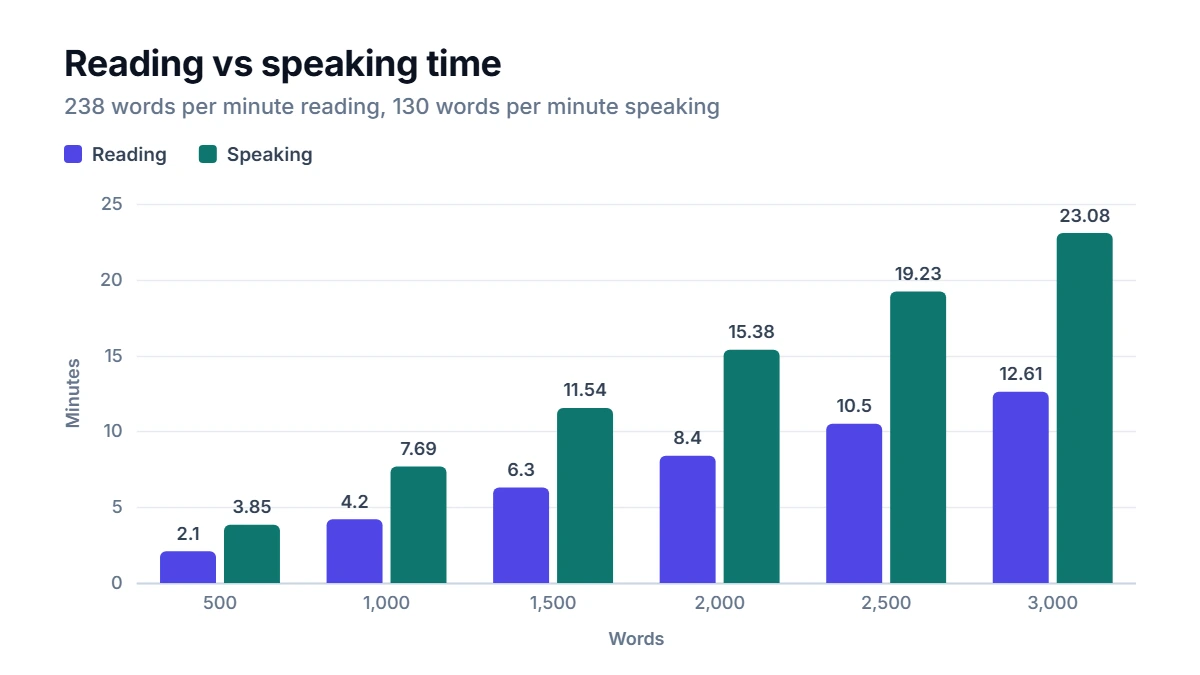
Some useful reference points:
- 500 words: about 2 minutes to read, a little under 4 minutes to say aloud
- 1,000 words: about 4 minutes 12 seconds to read, about 7 minutes 42 seconds to speak
- 2,000 words: about 8 minutes 24 seconds to read, about 15 minutes 23 seconds to speak
- 3,000 words: about 12 minutes 36 seconds to read, about 23 minutes to speak
Treat these as planning figures. Technical text, unfamiliar vocabulary and text read on a small screen all slow readers down, while light, familiar content can go much faster.
Planning a talk or presentation
Working backwards is the most useful trick. Multiply the time you have by 130 to get a word budget:
- 5-minute talk: 5 × 130 = about 650 words
- 10-minute talk: about 1,300 words
- 20-minute talk: about 2,600 words
Leave room for pauses, slides, questions and the moments where you inevitably go off script. Many speakers aim 10 to 15% under the budget. If you know you speak quickly, time yourself reading one paragraph aloud and adjust.
Characters vs words
Some limits are set in characters rather than words: text messages, social media posts, form fields, page titles and meta descriptions. Characters with spaces is the usual measure for these, because the space between words takes up room too. Characters without spaces is more common in translation and typesetting quotes.
As a rough guide, English text averages around five to six characters per word including the space, so 1,000 characters is somewhere between 160 and 200 words. Text with long technical words will have fewer words per character.
Tips for hitting a word limit
- Cut filler first. Words like "very", "really", "actually" and "in order to" can usually go without changing the meaning.
- Check repeated words. The top words list in the Word Counter shows which content words you lean on most, ignoring small words like "the" and "and". A word appearing far more than others is often a sign of repetition.
- Shorten long sentences. Splitting a 40-word sentence into two often saves words, because you drop linking phrases.
- Know what is included. Ask whether titles, references, footnotes and captions count toward the limit before you start trimming.
FAQ
How many pages is 1,000 words?
It depends on the font, size, spacing and margins. A common rule of thumb for 12-point text with standard margins is about two pages single-spaced or about four pages double-spaced.
How many words are in a 5-minute speech?
At a comfortable 130 words per minute, about 650 words. A fast speaker might fit 750 or more, and a slow, deliberate one closer to 550.
Do numbers and abbreviations count as words?
In most counters, yes. A number like 2026 or 4.5 counts as one word, and so does an abbreviation like "NASA" or "Q3". Standalone symbols such as % or & generally do not.
Why doesn't the top words list show "the" or "and"?
Very common small words would fill the list in almost any text and say nothing about your writing. The list skips them so the words that actually carry your content, and any you may be overusing, stand out.
