What Is a Good Typing Speed? WPM, Accuracy and How to Improve
How fast is fast enough? Learn how words per minute and accuracy are measured, what typical typing speeds look like, how much time a faster pace saves and the habits that make you quicker.

Typing speed is a skill most of us use for hours every day without ever measuring it. Yet the gap between 40 and 60 words per minute adds up to whole working days over a year for anyone who writes a lot. This guide explains how typing speed is measured, what counts as a good score, why accuracy matters as much as speed and how to get faster.
How words per minute are counted
A typing test does not count real words. It counts characters, including spaces and punctuation, and treats every 5 characters as one "word". This keeps scores fair: a passage full of long words would otherwise score lower than one full of short ones.
- Gross WPM = (characters typed ÷ 5) ÷ minutes. It counts everything you typed, right or wrong.
- Net WPM = gross WPM minus uncorrected errors per minute. It measures usable text.
- Accuracy = correct keystrokes ÷ all keystrokes. Mistakes count against accuracy even if you fix them.
Some tests report characters per minute (CPM) instead; divide by 5 to get WPM. Data entry jobs sometimes use keystrokes per hour (KPH): 60 WPM is about 18,000 keystrokes per hour.
What is a good score?
There is no official scale, but typical ranges look like this:
- Under 30 WPM: hunting for keys, often looking at the keyboard.
- 30 to 40 WPM: a common speed for casual typists.
- 50 to 60 WPM: comfortable for office work and long emails.
- 70 to 80 WPM: fast, typical of people who type all day.
- Above 100 WPM: competitive typists and some professional transcribers.
Aim for 95% accuracy or better at whatever speed you have. Below that, you spend so much time fixing mistakes that the speed is partly an illusion.
A worked example: two typists
Alex takes a 1-minute test and types 342 characters but leaves 12 errors in the text. Alex pressed 360 keys, 30 of them wrong.
- Gross: 342 ÷ 5 = 68.4 WPM.
- Net: 68.4 − 12 = 56.4 WPM.
- Accuracy: 330 ÷ 360 = 91.7%.
Jordan takes a 3-minute test and types 945 characters with 6 errors left. Jordan pressed 990 keys, 51 of them wrong.
- Gross: 945 ÷ 5 ÷ 3 = 63.0 WPM.
- Net: 63.0 − 6 ÷ 3 = 61.0 WPM.
- Accuracy: 939 ÷ 990 = 94.8%.
Alex has the higher raw speed, but Jordan produces more correct text per minute, and over a longer, more tiring test. For real work, Jordan is the better typist. Short tests flatter you: it is easy to sprint for one minute and much harder to hold the pace for five.
Why speed matters more than you think
The time saved grows with how much you write. Typing 1,000 words (5,000 characters) takes this many minutes of pure typing:
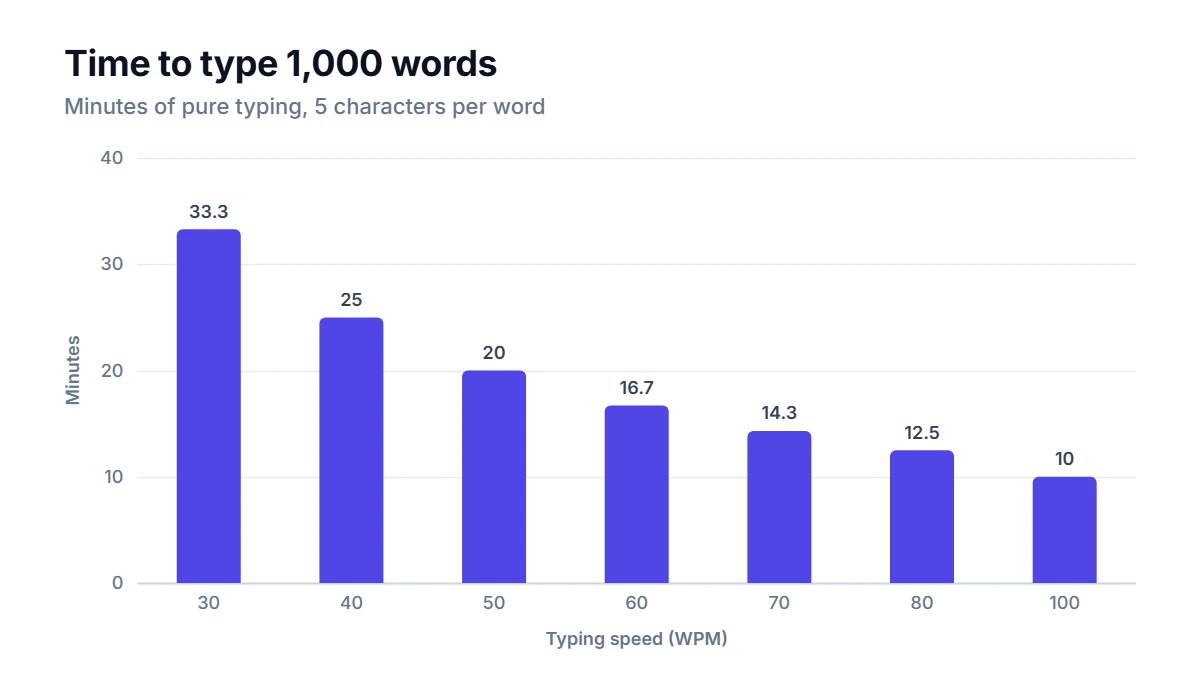
- 30 WPM: 33.3 minutes
- 40 WPM: 25.0 minutes
- 60 WPM: 16.7 minutes
- 80 WPM: 12.5 minutes
Going from 40 to 60 WPM saves more than 8 minutes for every 1,000 words. If you write 2,000 words a day across emails, chats and documents, that is about 17 minutes a day, or more than 60 hours over a working year of about 230 days. Real writing also involves thinking, so the actual saving is smaller, but the direction is clear.
How to get faster
- Learn touch typing. Rest your fingers on the home row (A S D F and J K L ;), with each finger responsible for its own column of keys. The small bumps on F and J let you find the position without looking.
- Stop looking down. It feels slow for a week or two and then pays off for life.
- Slow down to speed up. Practice at a pace where you make almost no mistakes. Speed follows accuracy; accuracy rarely follows speed.
- Practice little and often. Ten to fifteen minutes a day beats an hour once a week, because muscle memory builds through repetition and rest.
- Work on weak spots. If numbers, capitals or certain letter pairs slow you down, drill them on their own.
- Check your setup. Sit with your elbows at about a right angle and your wrists level. Tension in the shoulders and wrists costs both speed and comfort.
How to use the Typing Speed Test
Choose 1, 3 or 5 minutes and start typing the passage shown. The timer begins with your first keystroke, so you can read the text and settle your hands first. Correct letters turn green and mistakes turn red as you go. At the end, the Typing Speed Test shows your net and gross WPM, your accuracy and the errors left in the text. Take a longer test now and then to measure stamina, and repeat the test every week or two to see your progress; each run uses fresh practice text.
FAQ
Is typing on a phone measured the same way?
The formula is the same, but phone typing is a different skill. Most people type much slower on a touchscreen than on a keyboard, and autocorrect can both help and add errors. Compare phone scores only with other phone scores.
Does the keyboard make a difference?
A little. A keyboard you are used to, with comfortable key travel, matters more than any brand or switch type. Moving between very different keyboards, such as a laptop and a large desktop keyboard, can cost a few WPM for a while.
Should I learn an alternative layout such as Dvorak?
Some people find alternative layouts more comfortable, but relearning takes weeks or months, and most computers you use will still have QWERTY. For most people, proper touch typing on QWERTY is the better investment.
How fast do professionals type?
It depends on the job. Many office roles are happy with 40 to 60 WPM, while transcription and data entry roles often ask for more. Job ads usually state their own requirement and how they test it.
