What Is JSON? Syntax Rules and Common Errors
JSON is the plain-text format behind most APIs and config files. Learn its value types, the strict rules that cause most errors, how formatting changes file size, and how to read a validator's error message.

JSON is the format that most web apps, APIs and configuration files use to pass data around. It is plain text, short enough to read by eye, and strict enough that any programming language can parse it reliably. That strictness is also why a single stray comma can break a whole file. Learning the handful of rules, and the mistakes people make most often, saves a lot of head-scratching.
What JSON is
JSON stands for JavaScript Object Notation. It began as a subset of JavaScript syntax, but today it is a language-independent standard (RFC 8259), and nearly every language ships with a JSON parser. When your weather app asks a server for the forecast, the answer very likely arrives as JSON.
A JSON document is one value. That value can be:
- an object: a set of name and value pairs in curly braces, such as
{"city": "Denver"} - an array: an ordered list in square brackets, such as
[1, 2, 3] - a string: text in double quotes, such as
"hello" - a number: such as
42,-3.5or6.02e23 - one of the three literals
true,falseornull
Objects and arrays can hold any of these, including other objects and arrays. That nesting is what lets JSON describe almost any structure.
The rules that trip people up
JSON looks like JavaScript, but it is deliberately stricter:
- Names must be strings in double quotes.
{"name": "Ada"}is valid;{name: "Ada"}and{'name': 'Ada'}are not. - Strings use double quotes only. Single quotes are never allowed.
- No trailing commas.
[1, 2, 3,]is invalid, even though many programming languages accept it. - No comments. There is no
//or/* */in JSON. - No undefined, NaN or Infinity. Only
true,falseandnullmay appear without quotes. - No leading zeros on numbers.
12is fine,012is not. - No raw line breaks inside strings. Write
\ninstead. - One top-level value. Several objects one after another must be wrapped in an array.
These rules exist so that every parser in every language reads a document the same way. JSON gave up some convenience for that predictability.
A real example
Here is a small order record, written on one line as an API might send it:
{"order":1042,"customer":{"name":"Maya Chen","email":null},"items":[{"sku":"MUG-01","qty":2,"price":12.5},{"sku":"TEA-07","qty":1,"price":8.99}],"paid":true}
It contains every JSON type: a number (order), a nested object (customer), a null (email), an array of objects (items) and a boolean (paid). Formatted with 2-space indentation it becomes 20 lines and is much easier to scan: you can see at a glance that there are two items and that each has a sku, a quantity and a price. The deepest nesting level is 3: the order object, the items array, and each item object.
Pretty-printed versus minified
Whitespace between values is optional, so the same data can be written compactly or for people. For the order above, the character counts are:
- Minified: 157 characters
- Indented with tabs: 224 characters
- Indented with 2 spaces: 260 characters
- Indented with 4 spaces: 332 characters
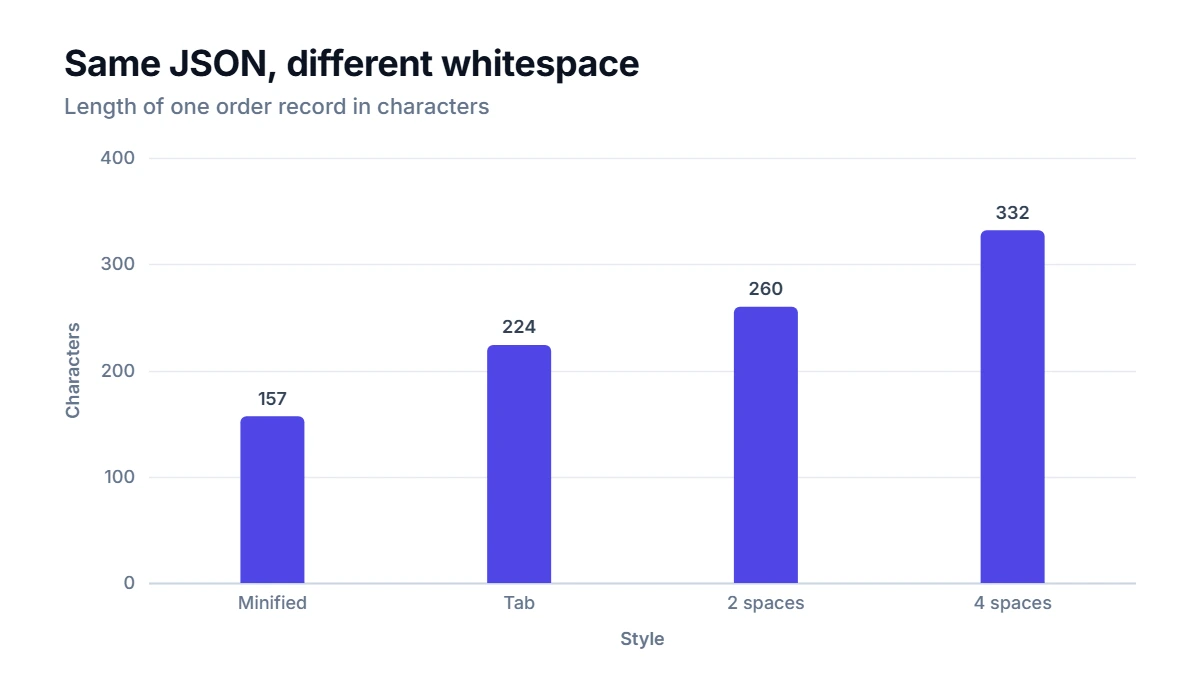
Four-space indentation more than doubles this small document. For files people edit, readability wins. For data sent over a network millions of times, minifying saves bandwidth, although servers usually compress responses as well, which shrinks the gap.
Reading error messages
Because the grammar is strict, good validators can point at the exact character that breaks it. Some typical problems and the kind of message the JSON Formatter & Validator gives:
{'name': 'Ada'}: property names must use double quotes, not single quotes (line 1, column 2).[1, 2,]: trailing comma before the closing bracket (line 1, column 6).{"price": 012}: numbers cannot have leading zeros.{"a": undefined}: an unexpected word; text values need double quotes.- A missing comma between two properties on separate lines is reported at the start of the second property name, because that is where the parser first realizes something is wrong.
That last point matters: the error position is where the parser noticed the problem, which is sometimes just after the real mistake. If the reported line looks fine, check the end of the line before it.
How to use the formatter
Paste your JSON into the JSON Formatter & Validator, choose 2 spaces, 4 spaces or a tab, and press Format to pretty-print it, Minify to strip whitespace, or Validate to only check it. Errors come with a line, a column, a plain-English reason and a caret under the problem. Everything runs in your browser, so API responses or config files with private data never leave your device. Numbers are copied exactly as written, so very large IDs keep every digit.
JSON compared with other formats
- XML is older and more verbose, with opening and closing tags. It supports attributes, comments and schemas, and is still common in documents and enterprise systems.
- YAML is a superset of JSON that uses indentation instead of braces and allows comments. It is popular for configuration files but is easier to get subtly wrong.
- CSV is ideal for flat tables, such as spreadsheets, but has no standard way to nest data.
JSON sits in the middle: structured enough for nested data, simple enough to read, and supported everywhere.
FAQ
Is JSON the same as a JavaScript object?
No. A JavaScript object is a live structure in a running program, and its literal syntax is looser. JSON is text that follows stricter rules. You turn one into the other with functions such as JSON.parse and JSON.stringify in JavaScript, or their equivalents in other languages.
Can JSON contain dates?
There is no date type. Dates are usually stored as strings in ISO 8601 format, such as "2026-11-01T09:30:00Z", or as a number of seconds or milliseconds since 1970. The program reading the JSON has to know which convention was used.
Does the order of keys matter?
The standard treats an object as an unordered set of names and values, so you should not rely on key order. In practice most tools preserve the order they read, which keeps diffs and logs readable.
What is the difference between null and an empty string?
null means "no value," while "" is a string that happens to contain no characters. APIs often use null for an unknown or missing field, as in the email of the example order, and an empty string for a value that is known to be blank.