What Makes a Strong Password?
Strength comes from randomness and length, not from one capital letter and a symbol. See how password entropy is measured and why a long random password beats a clever one.

Most advice about passwords is a list of rules: one capital letter, one number, one symbol, change it every few months. Those rules miss the point. A password is strong when it is hard to guess, and the hardness of guessing can actually be measured. Once you see how that measurement works, it becomes clear why length beats cleverness and why a random password from a generator is safer than anything you make up yourself.
How passwords are actually attacked
Attackers rarely sit at a login page typing guesses. More often a website's database is stolen, and the stolen data contains scrambled versions (hashes) of passwords. The attacker then tests guesses offline, as fast as their hardware allows, with no lockouts and no rate limits.
They do not start with random guesses either. They begin with lists of leaked passwords, common words, names, dates and keyboard patterns, then try the usual tweaks: a capital first letter, a number at the end, "a" swapped for "@". A password like Summer2026! follows every common rule and is still among the first things tried.
That leaves two defenses that really work: a password that is random, so no list or pattern contains it, and long, so trying every possibility takes too long.
Measuring strength: entropy
For a truly random password, strength is easy to calculate. If each character is picked from a pool of P possible characters and the password is L characters long, the number of possible passwords is P to the power L. Expressed in bits, that is:
entropy = L × log2(P)
Every extra bit doubles the number of guesses needed. An attacker who must search the whole space will, on average, find the password halfway through.
The pool size depends on which character types you allow:
- Digits only: 10 characters
- Lowercase letters: 26
- Upper and lowercase letters plus digits: 62
- All of the above plus 28 common symbols: 90
A worked example
Take a 16-character password using all four character types, so P = 90.
- log2(90) ≈ 6.49 bits per character.
- 16 × 6.49 ≈ 103.9 bits.
- That is about 2 to the power 104 possible passwords.
To put that in perspective, imagine an attacker who can test a hypothetical 10 billion guesses per second offline. On average they would need around 29 trillion years to find one 16-character password. Compare that with shorter passwords from the same 90-character pool:
- 8 characters (51.9 bits): about 2.5 days on average
- 12 characters (77.9 bits): about 450,000 years
- 16 characters (103.9 bits): about 29 trillion years
Real attack speeds depend heavily on how the website stored passwords, so treat these as illustrations of scale rather than predictions. The pattern is the useful part: every few characters add an enormous safety margin.
Length beats complexity
You can raise entropy by adding character types or by adding length. Length wins, as the chart shows:
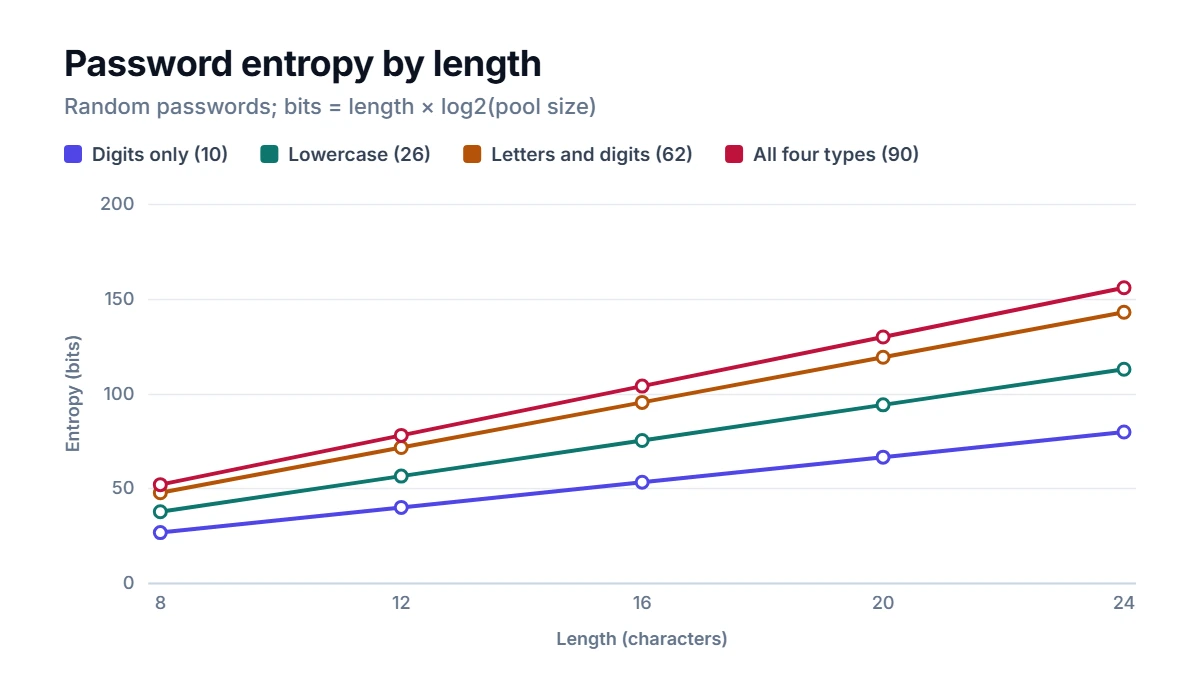
A 16-character password made only of lowercase letters (75.2 bits) is stronger than a 10-character password with every character type (64.9 bits). A 12-character password of letters and digits (71.5 bits) is already rated strong. Symbols help, but they are not a substitute for length, and some websites reject them anyway. If a site refuses symbols, turn them off and add a few more characters.
Why humans are bad at random
The entropy formula only applies when every character is chosen at random. People are predictable: we capitalize the first letter, put numbers at the end, use names, years, sports teams and keyboard runs like qwerty. A human-made 12-character password might have the same length as a random one, but its real strength can be a small fraction of what the formula suggests, because attackers search the predictable patterns first.
A good generator removes the human from the choice. It picks every character from a cryptographically secure random source, so the formula holds.
Using the Password Generator
The Password Generator creates a password as soon as the page opens. Set the length anywhere from 8 to 128 characters, choose which character types to include and, if you will ever need to type the password from a screen or read it aloud, tick the option to exclude look-alike characters such as O, 0, I, l and 1. The result shows a strength label and an entropy estimate in bits, so you can see the effect of each change immediately. Everything happens in your browser: the password is not sent anywhere or stored, so copy it into your password manager before closing the page.
Excluding look-alikes shrinks the full pool from 90 to 85 characters. For a 16-character password that costs only about one bit (102.6 instead of 103.9), which is a fair trade for fewer typos.
Habits that matter as much as strength
- Never reuse passwords. When one site is breached, attackers try the same email and password on others. A unique password limits the damage to one account.
- Use a password manager. It remembers dozens of long random passwords so you only have to remember one strong master password.
- Turn on two-factor authentication for email, banking and other important accounts. Even a stolen password is then not enough on its own.
- Make the master password memorable and long. A passphrase of several random words is easier to type and remember than random characters and can be just as strong.
- Change a password when there is a reason, such as a breach notification, rather than on a fixed schedule.
FAQ
Is a long passphrase as good as a random password?
It can be, if the words are chosen at random from a large list rather than picked by you. Five or six random words from a list of several thousand give roughly 65 to 78 bits, comparable to a 10 to 12 character random password with every character type, and are much easier to type and remember.
Should I write my passwords down?
A password manager is the better option. If you do write one down, such as a master password for emergencies, keep the paper somewhere physically secure and never next to the device it unlocks.
How often should I change my passwords?
Current guidance from many security bodies is to change a password when there is a sign it may be compromised, not on a timer. Forced regular changes tend to produce weaker, more predictable passwords.
Does adding one symbol to a word make it strong?
Not really. Password1! meets typical complexity rules but follows patterns attackers try early. Strength comes from randomness and length, not from a single symbol tacked on.