How to Calculate Hours Worked and Overtime
Turn start and end times into a weekly total, handle overnight shifts, convert hours and minutes to decimal hours, and estimate overtime and gross pay with a worked example.

If you are paid by the hour, a few minutes here and there add up. Checking your own hours against a paycheck, filling in a timesheet for a client, or planning whether an extra shift tips you into overtime all start with the same task: turning start and end times into a total. This guide walks through the method, the overnight shift trap, the difference between 7:45 and 7.75 hours, and how overtime and gross pay follow from the total.
The basic method
For each day you work:
- Convert the start and end times to a 24-hour clock, so 5:15 PM becomes 17:15.
- Subtract the start time from the end time.
- Subtract any unpaid break.
Then add up the days for the week. The safest way to do the subtraction is in minutes, because hours and minutes do not mix well with ordinary decimals. 8:45 is 8 × 60 + 45 = 525 minutes, and 17:15 is 17 × 60 + 15 = 1,035 minutes. The difference is 510 minutes. Take off a 30-minute lunch and you have 480 minutes, which is exactly 8 hours.
A worked week
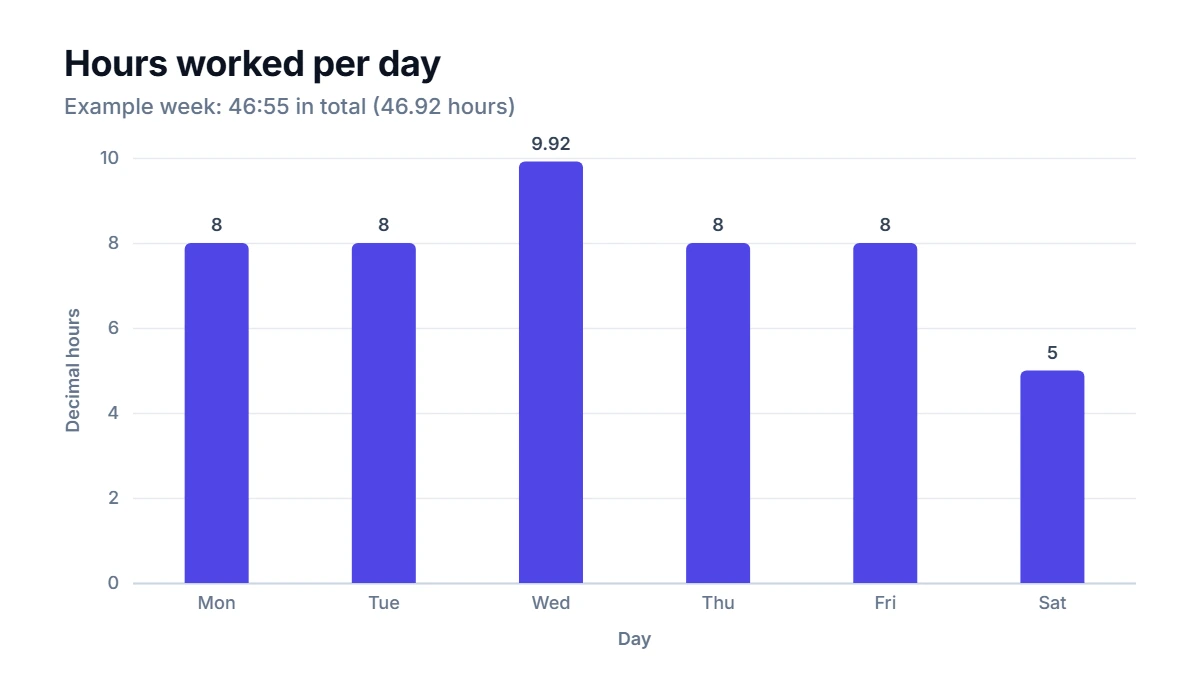
Here is a realistic week with uneven days, an evening that ran late and a weekend night shift.
- Monday: 8:45 to 17:15, 30-minute break = 8:00
- Tuesday: 8:45 to 17:15, 30-minute break = 8:00
- Wednesday: 9:00 to 19:40, 45-minute break = 9:55
- Thursday: 8:45 to 17:15, 30-minute break = 8:00
- Friday: 7:30 to 16:00, 30-minute break = 8:00
- Saturday: 22:00 to 3:15 the next morning, 15-minute break = 5:00
- Sunday: off
Wednesday is the one to check: 9:00 to 19:40 is 10 hours and 40 minutes, and the 45-minute break leaves 9 hours and 55 minutes.
The weekly total is 46 hours 55 minutes, or 46.92 decimal hours.
Overnight shifts
Saturday's shift starts at 22:00 and ends at 3:15. Subtracting naively gives a negative number. The fix is to add 24 hours to the end time whenever it is earlier than the start time: 3:15 becomes 27:15, and 27:15 − 22:00 = 5:15. After the 15-minute break, the shift is 5 hours.
In this kind of weekly total, the whole overnight shift is usually counted on the day it starts. Some employers split it at midnight instead, which matters if overtime or premium pay depends on the day. Check how your workplace does it.
Hours and minutes vs decimal hours
This is where most timesheet errors happen. 46:55 means 46 hours and 55 minutes. It is not 46.55 hours. To convert minutes to a decimal, divide by 60:
- 55 minutes ÷ 60 = 0.9167, so 46:55 = 46.92 hours
- 45 minutes = 0.75 hours
- 30 minutes = 0.5 hours
- 15 minutes = 0.25 hours
- 6 minutes = 0.1 hours
Payroll systems almost always want decimal hours, because pay is rate × hours. Typing 46.55 instead of 46.92 would underpay you by 0.37 hours, and at the overtime rate in the next section that is about 12.38 lost on one week.
Overtime and gross pay
A common rule is that hours above 40 in a week are overtime, paid at 1.5 times the normal rate, often called time and a half. Rules vary by country, state, industry and contract, so check the ones that apply to your job.
With a rate of 22.50 an hour:
- Regular hours: the first 40 hours. 40 × 22.50 = 900.00
- Overtime hours: 46:55 − 40:00 = 6:55, which is 6.92 hours. The overtime rate is 22.50 × 1.5 = 33.75, and 6.9167 × 33.75 = 233.44
- Estimated gross pay: 900.00 + 233.44 = 1,133.44
Notice that the overtime pay uses the exact minutes, not the rounded 6.92. Rounding the hours first and then multiplying can move the result by a cent or two.
This is gross pay before taxes, insurance, retirement contributions and other deductions. It is an estimate for checking your numbers, not financial or payroll advice.
How to use the Hours Calculator
Enter a start time, an end time and any unpaid break in minutes for each day you worked, and leave the other days blank. An end time earlier than the start time is treated as an overnight shift automatically. To see pay, add your hourly rate; you can also change the overtime threshold (40 hours a week by default) and the multiplier (1.5 by default). Press Calculate to get a table with each day in both h:mm and decimal hours, then the weekly total split into regular and overtime hours, and an estimated gross pay if you entered a rate.
Common mistakes
- Reading h:mm as a decimal. 7:45 is 7.75 hours, not 7.45.
- Forgetting unpaid breaks, or subtracting paid ones. Only unpaid breaks come off. Paid rest breaks count as working time.
- Mixing AM and PM. A shift from 9:00 to 5:30 is not 3.5 hours unless you worked through the night. Using a 24-hour clock avoids the confusion.
- Ignoring your employer's rounding. Some payroll systems round each clock-in and clock-out, for example to the nearest quarter hour. Your total can differ from the exact minutes by a little.
- Applying overtime per day when your rule is per week, or the other way round. Some places use both daily and weekly limits.
FAQ
How many hours is 9 to 5?
From 9:00 to 17:00 is 8 hours. If you take an unpaid 30-minute lunch, you work 7.5 hours, or 37.5 hours over a five-day week.
Do short breaks count as hours worked?
It depends on your local rules and your contract. Short rest breaks are often paid and therefore count, while longer meal breaks where you are fully off duty are often unpaid. Check your employment terms.
How do I add up hours and minutes by hand?
Add the hours and the minutes separately, then turn every 60 minutes into an hour. For 8:40 + 7:35, that is 15 hours and 75 minutes, which becomes 16:15.
How do I convert decimal hours back to minutes?
Multiply the decimal part by 60. For 6.92 hours, 0.92 × 60 is about 55, so 6.92 hours is roughly 6 hours 55 minutes.
