How to Calculate Sales Tax (and Remove It from a Total)
Two formulas cover every sales tax question: adding tax to a price and finding the tax inside a total. Here is how both work, the shortcut that gives the wrong answer and why receipts differ by a cent.

Sales tax is simple arithmetic, yet it trips people up all the time: at the register, when checking a receipt, when pricing products for a small business, or when trying to work out what a price "really" was before tax. There are only two questions you ever need to answer. How much do I pay when tax is added to a price? And how much of a total is tax? Each has its own formula, and mixing them up is the most common mistake.
What sales tax is
Sales tax is a percentage that a government charges on the sale of goods and some services. The seller collects it at the checkout and passes it on. In the United States, shelf prices are usually shown without sales tax, and the tax appears only on the receipt. In many other countries a similar tax called VAT or GST is already included in the price you see. The math is identical; only the starting point differs.
The rate you pay often stacks several layers. A purchase might carry a 6.25% state rate, a 1% county rate and a 1% city rate, for a combined 8.25%. Rates and the list of taxed items change, and some products are exempt or taxed at a reduced rate, so check the current rules for the place where you buy.
Adding tax to a price
When you know the price before tax, the steps are:
- Convert the rate to a decimal: 8.25% becomes 0.0825.
- Multiply the price by it to get the tax.
- Add the tax to the price to get the total.
Or in one go: Total = Price × (1 + rate).
Example: a 249.99 purchase at 8.25%
- Tax = 249.99 × 0.0825 = 20.624…, which rounds to 20.62
- Total = 249.99 + 20.62 = 270.61
A quick mental check: 10% of 249.99 is about 25, so 8.25% should be a bit less than 25. It is.
Discounts come first
If an item is on sale, tax is normally charged on the price you actually pay. An 80.00 jacket with 25% off costs 60.00, and 8.25% tax on that is 4.95, for a total of 64.95. Taxing the full 80.00 would give 6.60 of tax, which is not what you owe. Coupon rules can vary, so check local rules if a manufacturer's coupon is involved.
Removing tax from a total
Now the reverse: you have a tax-inclusive total and want to know the price before tax. The steps are:
- Add 1 to the decimal rate: at 7%, that is 1.07.
- Divide the total by it to get the price before tax.
- Subtract that from the total to get the tax.
Price before tax = Total ÷ (1 + rate)
Example: 53.50 including 7% tax
- Price before tax = 53.50 ÷ 1.07 = 50.00
- Tax = 53.50 − 50.00 = 3.50
You can check the answer by going forward again: 50.00 × 1.07 = 53.50.
The shortcut that gives the wrong answer
The tempting shortcut is to take the tax rate straight off the total: 7% of 53.50 is 3.75, not 3.50. It is wrong because the tax was calculated on the price before tax, not on the total. The share of a total that is tax is always rate ÷ (1 + rate), so at 7% only 7 ÷ 107 ≈ 6.54% of the total is tax.
The error is small at low rates and grows quickly at higher ones, which matters for VAT rates of 20% or more:
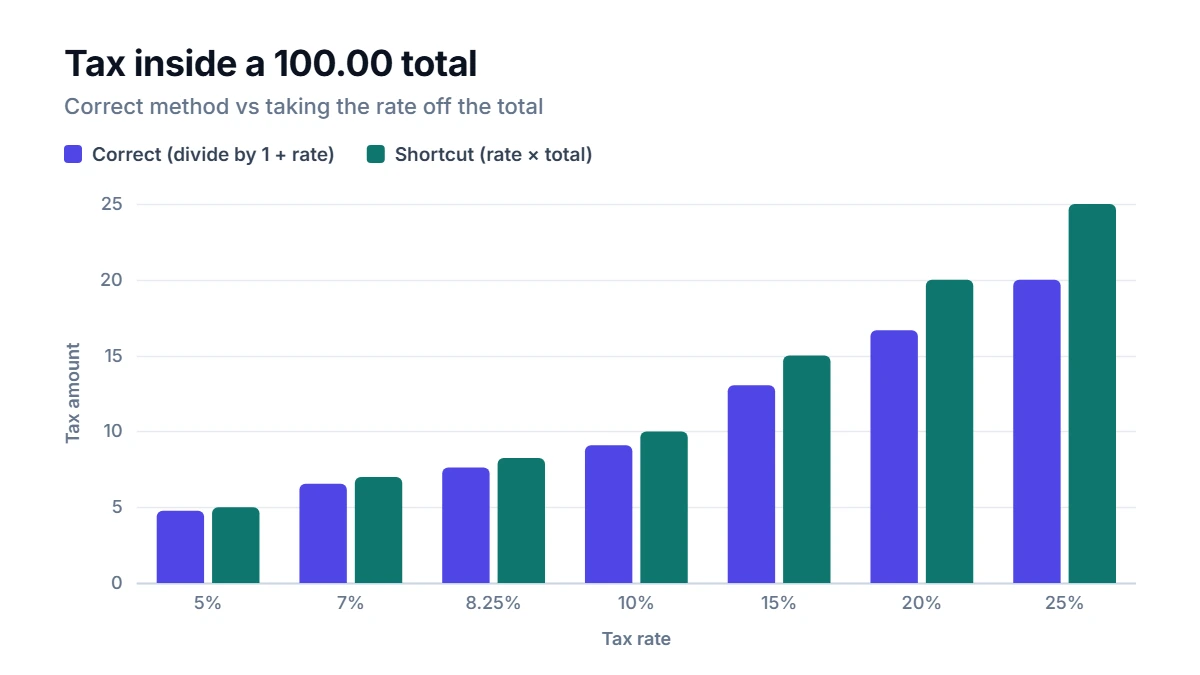
At 20%, the shortcut says 20.00 of a 100.00 total is tax, but the true figure is 16.67. At 25% the shortcut overstates the tax by 5.00 on every 100.00.
Rounding: why your receipt may differ by a cent
Tax is rounded to the cent, and shops can round per item or on the whole receipt. Three items at 1.99 with 8.25% tax show the difference:
- Rounded per item: 0.16 tax each, 0.48 in total
- Rounded on the total of 5.97: 0.49 in tax
Neither is wrong; it depends on the seller's system and local rules. If you are reconciling business records, use the same method the seller uses.
Using the Sales Tax Calculator
The Sales Tax Calculator handles both directions. Choose Add tax to a price or Remove tax from a tax-inclusive price, enter the amount and the combined rate, and press Calculate. It shows the price before tax, the tax and the total, rounded to the cent so the three always add up. The same tool works for VAT and GST.
Tips for everyday use
- Combine the layers first. Add state, county and city rates together and enter one combined rate.
- Budget with the total, not the tag. For a large purchase, a few percent of tax can be a real amount: 8.25% on a 1,200 laptop is about 99.
- Keep receipts for business purchases. If you can reclaim or deduct tax, you will need the tax amount, and the reverse formula lets you check it.
- Small sellers: price with tax in mind. If you want a tax-inclusive price of exactly 20.00 at 8.25%, the price before tax has to be 20.00 ÷ 1.0825 ≈ 18.48.
Results are estimates for planning, not tax advice. Rates and exemptions vary by location and change over time.
FAQ
How do I work out the tax rate from a receipt?
Divide the tax amount by the price before tax and multiply by 100. A receipt showing 50.00 plus 3.50 of tax has a rate of 3.50 ÷ 50.00 × 100 = 7%.
Is shipping taxed?
It depends on where you are and how the seller lists the charge. Some places tax shipping, others do not, and some only tax it when it is part of the item price. Check the current rules for your area.
Is sales tax the same as VAT?
The calculation is the same, but the systems differ. Sales tax is usually collected once, at the final sale. VAT is collected at each stage of production and is normally included in shelf prices.
Why does my mental math never match the receipt exactly?
Usually because of rounding or because some items on the receipt are taxed at a different rate or not taxed at all. Groceries and medicines, for example, are often treated differently from general goods.

