How Subnetting Works: Plan an IPv4 Network Step by Step
Subnetting looks like binary magic until you see the one rule behind it. Learn to size subnets from a device count, keep them aligned and carve one address block into networks of different sizes.

You have one block of addresses and several groups of devices that should not all share a network: staff laptops, guest phones, cameras, printers. Subnetting is how you divide that block. It looks like binary magic, but it rests on one idea: every address has a network part and a host part, and you choose where the line between them falls.
Why networks get divided at all
A single large network works, but it has three problems. Every broadcast reaches every device, so noise grows with size. Everything can talk to everything directly, so a compromised camera can reach an accounting laptop. And troubleshooting is harder when one flat range holds every kind of device.
Separate subnets fix this. Traffic between them has to pass through a router or firewall, and that is where you can apply rules, such as letting guests reach the internet but nothing else.
The one rule behind everything
An IPv4 address has 32 bits. The prefix length (the /22 in 10.20.36.0/22) says how many of them, counted from the left, are fixed for the whole network. The rest are free to number devices. So:
- Addresses in a subnet = 2 to the power of (32 − prefix)
- Each extra prefix bit cuts the subnet in half
- Each bit removed from the prefix doubles it
That is why the numbers always come in powers of two. There is no such thing as a subnet of exactly 300 addresses; you get 256 or 512.
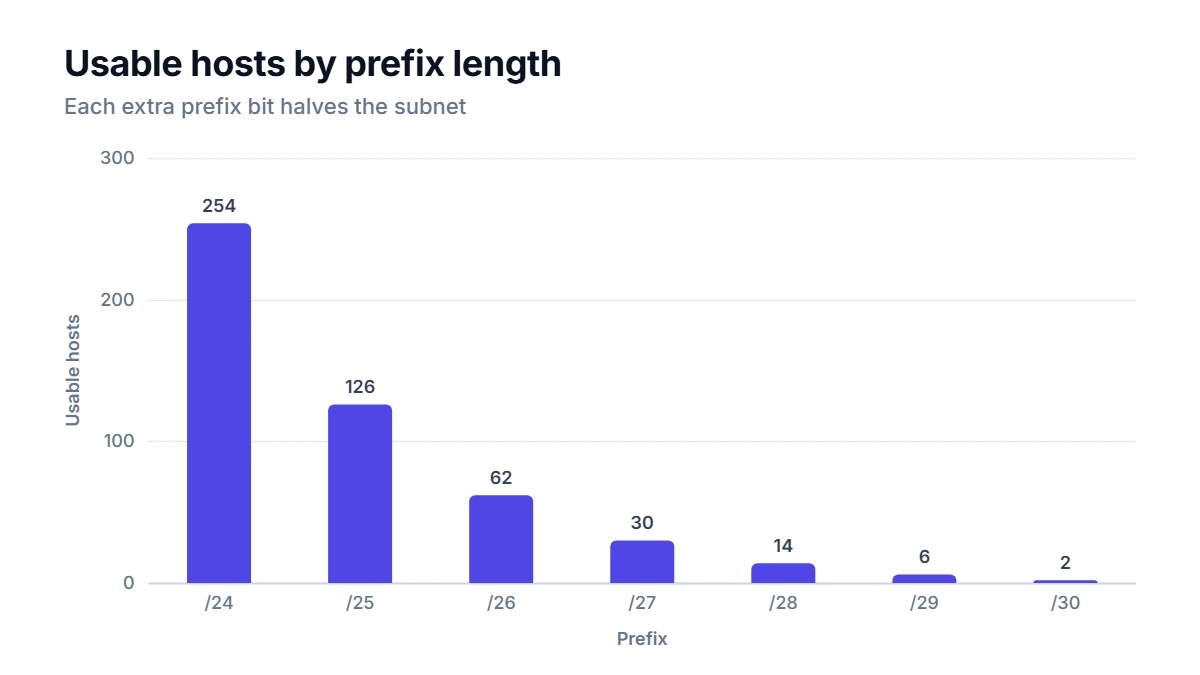
Sizing a subnet from a device count
Work backward from the number of devices in three steps:
- Take the number of devices you expect, including growth, and add 2 for the network and broadcast addresses.
- Round up to the next power of two. The exponent is the number of host bits you need.
- Subtract the host bits from 32 to get the prefix.
For 50 cameras: 50 + 2 = 52, the next power of two is 64 (2 to the 6th), and 32 − 6 gives /26. Do not forget the router's own address in each subnet, which also takes a slot. It is easy to miss, and a subnet that is full on day one is a nuisance to renumber later.
Why a mask cuts addresses where it does
Take the address 10.20.36.200 with a /22 prefix. In binary, the address and the mask are:
- Address:
00001010.00010100.00100100.11001000 - Mask:
11111111.11111111.11111100.00000000
Wherever the mask has a 1, the address bit is kept. Wherever it has a 0, the bit is cleared. The third byte stays 00100100, which is 36, and the last byte becomes 0, so the network is 10.20.36.0. Set all the host bits to 1 instead and you get the broadcast address, 10.20.39.255. The block holds 1,024 addresses and 1,022 usable hosts.
Notice that this network spans four values of the third byte (36 to 39). Prefixes that do not end on a dot boundary are where people slip, because the range no longer looks tidy in decimal.
Worked example: an office in one /22
Suppose your office gets 10.20.36.0/22 and needs five networks:
- Staff: 300 devices
- Guest Wi-Fi: 200 devices
- Cameras: 50 devices
- Printers: 20 devices
- A link between two routers: 2 devices
Splitting into equal parts does not work here. Five equal subnets means rounding up to eight /25 networks with 126 usable hosts each, which is too small for staff and wasteful for the router link. The answer is to give each group its own size, starting with the largest.
- Staff:
10.20.36.0/23, mask255.255.254.0, hosts10.20.36.1to10.20.37.254, 510 usable - Guest Wi-Fi:
10.20.38.0/24, mask255.255.255.0, hosts10.20.38.1to10.20.38.254, 254 usable - Cameras:
10.20.39.0/26, mask255.255.255.192, hosts10.20.39.1to10.20.39.62, 62 usable - Printers:
10.20.39.64/27, mask255.255.255.224, hosts10.20.39.65to10.20.39.94, 30 usable - Router link:
10.20.39.96/30, mask255.255.255.252, hosts10.20.39.97and10.20.39.98, 2 usable
These use 868 of the 1,024 addresses, leaving 10.20.39.100 to 10.20.39.255 free for later.
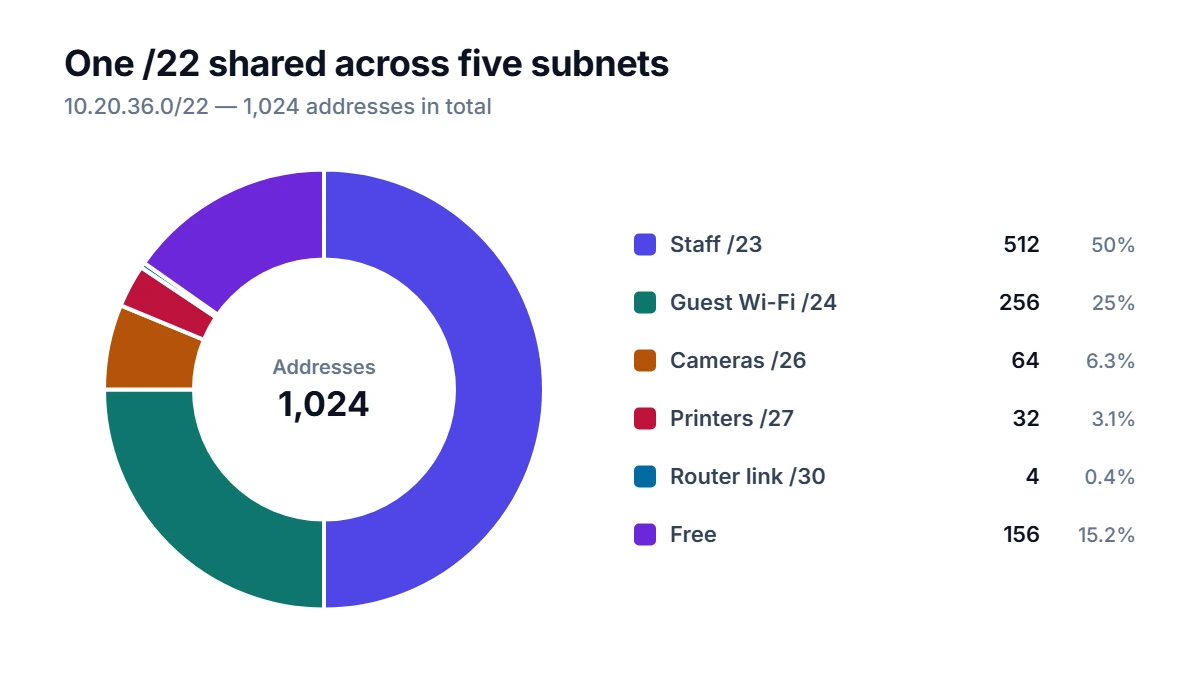
Why largest first?
A subnet must start on a multiple of its own size. A /27 holds 32 addresses, so it can begin at .0, .32, .64 and so on, but not at .70. If you type 10.20.39.70/27 into a calculator, the network comes back as 10.20.39.64, because that is the block .70 belongs to. Placing large subnets first keeps everything aligned without leaving awkward gaps. Placing small ones first often forces you to skip addresses before the next large block can start.
How to use the IP Subnet Calculator
Enter any address in a subnet along with its prefix or mask, and the IP Subnet Calculator shows the network, broadcast, host range, wildcard mask and a binary view. To check a plan like the one above, run each line separately and confirm that each network address is the one you wrote down and that the ranges do not overlap. For an equal split, enter a number in the split field: 10.20.36.0/22 split into 4 gives 10.20.36.0/24, 10.20.37.0/24, 10.20.38.0/24 and 10.20.39.0/24, with 254 usable hosts each.
Common mistakes
- Sizing for today only. Leave room to grow. Expanding a subnet later often means changing addresses on every device.
- Overlapping ranges.
10.20.36.0/23already contains all of10.20.37.x. Adding10.20.37.0/24as another network will cause routing confusion. - Assuming the mask matches the dots.
10.20.36.0/22and10.20.36.0/24start in the same place but end in very different ones. - Mixing up mask and wildcard.
255.255.252.0is a subnet mask;0.0.3.255is its wildcard form, used in some router rules. - Choosing a common range for a site that uses VPN. If the home networks of remote workers use
192.168.1.0/24, an office on the same range will collide with them. A less common block inside10.0.0.0/8avoids this.
FAQ
Can devices in different subnets talk to each other?
Yes, but only through a router or a layer 3 switch. A device sends traffic for another subnet to its default gateway, which forwards it if the rules allow. This is exactly what makes subnets useful for security.
Why is /24 so common?
Its boundary falls exactly on a dot, so the first three numbers identify the network and the last one identifies the device. That is easy to read, and 254 usable hosts suits many small networks, which is why home routers commonly use it.
Do I need subnetting at home?
Usually not, although a separate guest or smart-device network is a form of it. Many home routers offer this as a simple setting, without any address planning on your side.
Does subnetting make a network faster?
It can reduce broadcast traffic, which helps on very large networks, but it does not add bandwidth. On a small network the benefits are mainly security and organization.
Related guides

How to Verify a File Checksum With SHA-256 or MD5
A checksum lets you confirm that a download is complete and has not been tampered with. Learn what hashes are, why one changed letter changes everything and how to check a file on any computer.

What Is URL Encoding? Percent-Encoding Explained
Spaces, ampersands and accented letters can break a web address. Learn how percent-encoding turns them into safe sequences like %20, which characters need it, and how to avoid double encoding and other classic bugs.

What Is Base64 Encoding and How Does It Work?
Base64 turns any data into plain letters and digits so it can travel safely through systems built for text. Learn how the encoding works bit by bit, where you meet it every day and why it is not encryption.

HEX, RGB and HSL Color Codes Explained
How screens mix red, green and blue, how to read a HEX code by hand, and when HSL or HSV is the easier way to pick and adjust colors.