How to Verify a File Checksum With SHA-256 or MD5
A checksum lets you confirm that a download is complete and has not been tampered with. Learn what hashes are, why one changed letter changes everything and how to check a file on any computer.

Software download pages often list a long string of letters and numbers labeled "SHA-256" or "checksum" next to the download button. Most people skip it, but it is a simple and powerful safety check. It tells you whether the file on your computer is exactly, bit for bit, the file the publisher released. Checking it takes less than a minute once you know how.
What a checksum actually is
A checksum is the output of a hash function. A hash function reads any amount of data, a sentence or a 4 GB disk image, and produces a short fingerprint of fixed length. Good hash functions have three properties that matter here:
- Deterministic: the same input always gives the same hash.
- Avalanche effect: changing a single bit of the input changes about half of the output bits, so similar files have completely different hashes.
- Hard to fake: for a secure hash, nobody can practically create a different file with the same hash.
If the hash you calculate matches the one the publisher posted, the file is identical. If even one byte differs, through a broken download, a faulty disk or deliberate tampering, the hashes will not match.
One letter, a completely different hash
Here are the SHA-256 hashes of two short messages that differ by one character:
Meet at 7pm→a08301f7df29148bd2b8a8a77214f55da5818af882c0fd50e3fee5b903216d95Meet at 8pm→eff8250b79f49ecde6f18404e43beb90b37bdcd6b8a29f019de469c989d8bf96
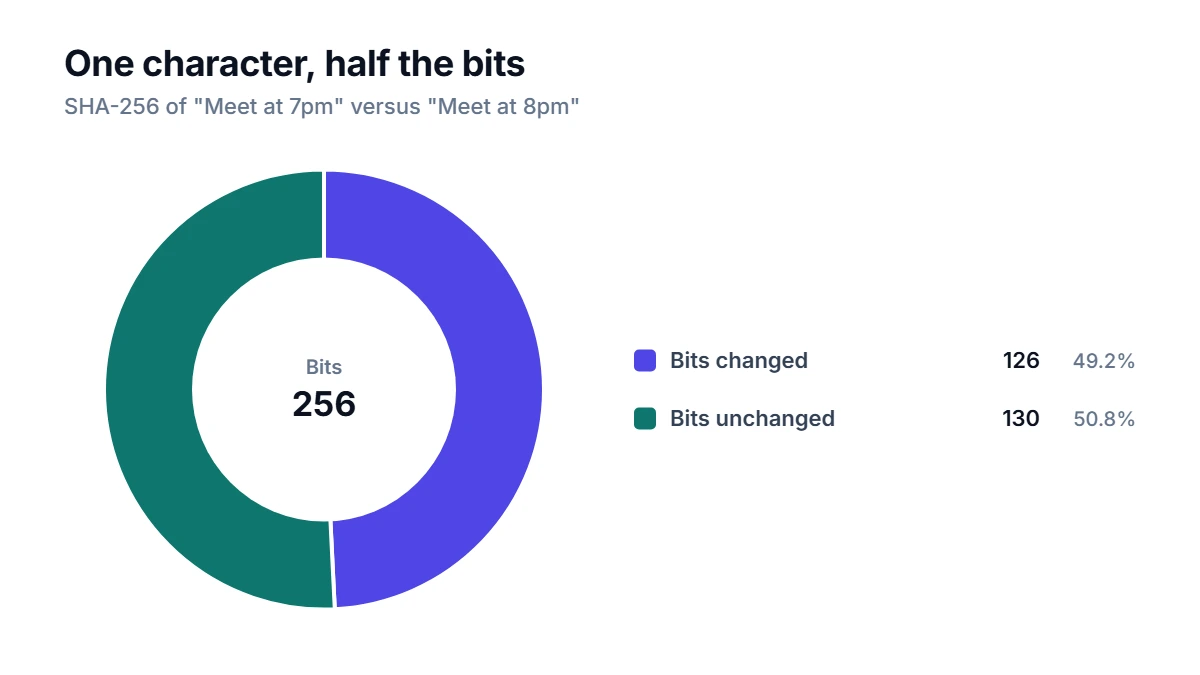
Comparing them bit by bit, 126 of the 256 bits are different, very close to the half you would expect by chance. There is no pattern that hints the inputs were nearly the same. Even invisible changes count: Meet at 7pm with a line break at the end hashes to something starting 9b0c6823, and meet at 7pm with a lowercase m starts 0d358350.
Which algorithm is which
The same message, hashed with each common algorithm, gives fingerprints of different lengths:
- MD5: 128 bits, 32 hex characters
- SHA-1: 160 bits, 40 hex characters
- SHA-256: 256 bits, 64 hex characters
- SHA-384: 384 bits, 96 hex characters
- SHA-512: 512 bits, 128 hex characters
The length is a quick way to tell which algorithm a published checksum uses. A 64-character value is almost always SHA-256.
MD5 and SHA-1 are now broken for security: researchers can build two different files with the same hash. They still catch accidental corruption, but a determined attacker could fool them. For anything security-related, use SHA-256 or longer.
How to verify a download, step by step
- Download the file and find the checksum the publisher lists, ideally on their official site rather than a mirror.
- Note the algorithm, usually SHA-256.
- Calculate the hash of your copy of the file.
- Compare the two values. Capital and lowercase letters do not matter in hex, but every character must match.
You can calculate the hash with built-in tools:
- Windows:
certutil -hashfile file.iso SHA256in Command Prompt, orGet-FileHash file.isoin PowerShell. - macOS:
shasum -a 256 file.isoin Terminal. - Linux:
sha256sum file.iso.
Or skip the command line: in the Hash Generator, choose File, pick the download and select SHA-256. Paste the published value into the expected hash box and it tells you at once whether they match. The file is read and hashed in your browser and is never uploaded, which matters for private documents. Files of up to 200 MB work well; for larger disk images, the built-in commands above are the better choice.
When the hashes do not match
Do not open or install the file. Then work through the likely causes:
- Incomplete download. Compare the file size with the one on the download page and download again.
- Wrong file or version. Publishers often list checksums for several versions and platforms. Make sure you picked the line for your exact file.
- Wrong algorithm. A SHA-1 value will never match a SHA-256 result.
- Text differences. When you hash text rather than a file, a trailing space, a final line break or Windows versus Unix line endings will change the result.
If a fresh download from the official site still does not match, report it to the publisher. A mismatch on a security-sensitive download could mean the file was altered.
What a checksum does not prove
A matching checksum proves that your file equals the file the checksum describes. It does not prove who made it. If an attacker controls the download page, they can replace both the file and the checksum. That is why many projects also publish digital signatures, which tie the file to the publisher's key. For everyday downloads from a trusted site over HTTPS, a checksum is still an excellent check against corruption and simple tampering.
Hashes are also not suitable for storing passwords. Even SHA-256 is far too fast; password storage needs slow, salted functions designed for that job.
FAQ
Can two different files have the same SHA-256 hash?
In theory yes, because there are more possible files than possible hashes. In practice no one has ever found such a pair for SHA-256. The number of possible outputs is so large that a random match is far less likely than a hardware error.
Why is the checksum shown in Base64 on some sites?
Base64 is just a shorter way to write the same bytes. A SHA-256 hash is 64 characters in hex and 44 in Base64. Make sure you compare like with like, or convert one format into the other first.
Does renaming a file change its hash?
No. The hash covers only the contents of the file, not its name, date or location. Two identical files with different names have the same hash.
Is it worth checking checksums for small downloads?
For apps, operating system images, firmware and anything you will install with administrator rights, yes. It takes a minute and catches both broken downloads and some tampering. For a photo or a PDF from a site you trust, it is rarely necessary.
Related tools

Related guides

What Is Base64 Encoding and How Does It Work?
Base64 turns any data into plain letters and digits so it can travel safely through systems built for text. Learn how the encoding works bit by bit, where you meet it every day and why it is not encryption.

How Subnetting Works: Plan an IPv4 Network Step by Step
Subnetting looks like binary magic until you see the one rule behind it. Learn to size subnets from a device count, keep them aligned and carve one address block into networks of different sizes.

What Is URL Encoding? Percent-Encoding Explained
Spaces, ampersands and accented letters can break a web address. Learn how percent-encoding turns them into safe sequences like %20, which characters need it, and how to avoid double encoding and other classic bugs.

HEX, RGB and HSL Color Codes Explained
How screens mix red, green and blue, how to read a HEX code by hand, and when HSL or HSV is the easier way to pick and adjust colors.