GB vs GiB: Data Storage Units Explained
Why a 2 TB drive shows about 1.82 TB on your computer, what the difference between GB and GiB really is, and how bits, bytes and internet speeds fit together.

You buy a 2 TB drive, plug it in and your computer says it holds about 1.82 TB. A 512 GB phone shows roughly 477 GB. Nothing is broken and nobody is cheating you: the box and the computer are using two different meanings of the same letters. Once you know the difference between decimal and binary units, and between bits and bytes, storage sizes and download speeds make much more sense.
Bits and bytes
Everything starts with the bit, a single 0 or 1. Eight bits make one byte, which is roughly enough to store one letter of plain text. File sizes and storage are measured in bytes. Network speeds are usually measured in bits per second, which is why a lowercase b (bit) and an uppercase B (byte) matter so much.
- 1 byte = 8 bits
- 300 Mbit/s ÷ 8 = 37.5 MB/s
So a 300 megabit connection can move at most 37.5 megabytes per second. Protocol overhead and Wi-Fi usually make real downloads a little slower.
Two kinds of prefixes
Decimal units (powers of 1,000)
These follow the same SI prefixes as kilometers and kilograms:
- 1 kB = 1,000 bytes
- 1 MB = 1,000,000 bytes
- 1 GB = 1,000,000,000 bytes
- 1 TB = 1,000,000,000,000 bytes
Drive and phone makers, network equipment and most file transfer tools use these.
Binary units (powers of 1,024)
Computers address memory in powers of 2, and 2^10 = 1,024 is close to 1,000. For decades, 1,024 bytes was loosely called a kilobyte. To remove the confusion, separate names were introduced:
- 1 KiB (kibibyte) = 1,024 bytes
- 1 MiB (mebibyte) = 1,048,576 bytes
- 1 GiB (gibibyte) = 1,073,741,824 bytes
- 1 TiB (tebibyte) = 1,099,511,627,776 bytes
RAM is almost always sold in binary amounts, and several operating systems measure disk space in binary units while still printing "GB" or "TB".
Why the gap grows with every prefix
At the kilo level the two units differ by only 24 bytes in 1,000, or 2.3%. But each step multiplies the difference again:
- kB vs KiB: a kilobyte is 2.34% smaller
- MB vs MiB: 4.63% smaller
- GB vs GiB: 6.87% smaller
- TB vs TiB: 9.05% smaller
- PB vs PiB: 11.18% smaller
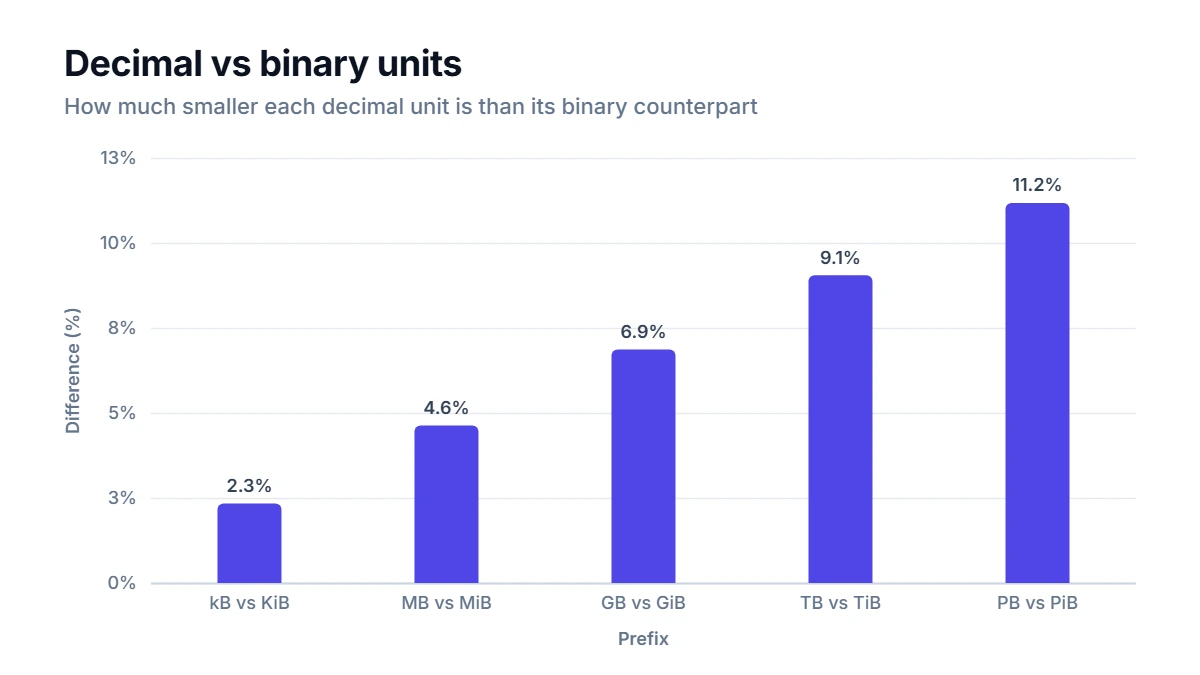
That is why the "missing space" seems small on a USB stick but large on a multi-terabyte drive.
Worked example: the 2 TB drive
- The drive holds 2 TB = 2,000,000,000,000 bytes.
- One TiB is 1,099,511,627,776 bytes.
- 2,000,000,000,000 ÷ 1,099,511,627,776 ≈ 1.819 TiB.
- In GiB, that is 2,000,000,000,000 ÷ 1,073,741,824 ≈ 1,862.65 GiB.
If your system divides by 1,024 but labels the result "TB", you see "1.82 TB". It is the same number of bytes, just measured in a bigger unit. The file system and any preinstalled files take a little more on top.
The same logic explains the phone: 512 GB is 512,000,000,000 bytes, which is about 476.84 GiB. And a single-layer DVD sold as 4.7 GB holds about 4,482.27 MiB.
Putting bits and bytes together
Suppose you want to download a 50 GB game on a 300 Mbit/s connection.
- Convert the file to bits: 50 GB × 8,000 = 400,000 Mbit.
- Divide by the speed: 400,000 ÷ 300 ≈ 1,333 seconds.
- That is about 22 minutes, at best. Real downloads are usually slower.
Mixing up bits and bytes here would give an answer eight times too fast or too slow, which is the most common mistake in download estimates.
Where each family is used
A rough guide to which unit you are likely looking at:
- Decimal (kB, MB, GB, TB): hard drives, SSDs, USB sticks, memory cards, phone storage on the box, mobile data plans, cloud storage plans and internet speeds.
- Binary (KiB, MiB, GiB, TiB): RAM, processor caches, many Linux tools, virtual machine and container settings, and the disk sizes some operating systems report, even when they print "GB".
When the label alone does not tell you, a quick test helps: if a size is a round power of two, such as 8, 16, 32 or 64 GB of memory, it is almost certainly binary.
How to use the Data Storage Converter
Enter a number, choose the unit you have and the unit you want, and press Convert. The Data Storage Converter covers bits, bytes, decimal units from kilobits to petabytes and binary units from kibibytes to pebibytes. It writes bit units as kbit, Mbit and Gbit so they cannot be mistaken for bytes. A table shows the same amount in all fifteen units, which is the quickest way to see what a drive or file size looks like in both systems at once.
Good to know
- Check which meaning a program uses. Some operating systems and tools now report decimal GB, others binary. If two programs disagree about a file size by about 7%, this is almost always the reason.
- RAM is binary. A "16 GB" memory module holds 16 GiB, or 17,179,869,184 bytes.
- Network units are decimal. One megabit per second is exactly 1,000,000 bits per second, never 1,048,576.
- Formatting uses some space. Even with the right unit, a new drive shows slightly less than its raw capacity because the file system needs room for its own records.
FAQ
Is a gigabyte 1,000 or 1,024 megabytes?
By the official SI definition, 1 GB is 1,000 MB. 1,024 MiB make 1 GiB. Older software often used GB for the binary amount, so you may still see both meanings.
Why do memory cards also look smaller than advertised?
For the same reason as hard drives: the card is sold in decimal units and your device may report binary units. A 128 GB card shows about 119.2 GiB before formatting.
How many bits are in a megabyte?
A decimal megabyte is 1,000,000 bytes, so it contains 8,000,000 bits. A mebibyte contains 8,388,608 bits.
Should I use GB or GiB?
Use whichever your audience expects, but label it correctly. GiB is clearer when you mean powers of 1,024, for example when talking about RAM or virtual machine sizes. GB is standard for drive capacities and data plans.
Related tools

Related guides

How to Convert Between Number Bases
Binary, octal, decimal and hexadecimal explained: how to read any base into decimal, how to convert decimal into any base by repeated division, and the quick binary-to-hex shortcut.

How to Read and Write Roman Numerals
Roman numerals look like a puzzle, but they follow a few simple rules. Learn a reliable way to read any numeral from left to right, how to write years like 1888 and 2049, and how to spot forms that are not standard.

Pressure Units Explained: psi, bar, kPa and More
psi, bar, kPa, millibars, inches of mercury and mmHg all measure the same thing. Learn what each unit means, how to convert between them and why gauge and absolute pressure differ.

How to Convert Volume Units (Metric, US and UK)
Liters, cups, fluid ounces and gallons all link back to the milliliter. Learn the simple two-step method, see worked kitchen and household examples, and avoid the US vs UK trap.