How to Convert Between Number Bases
Binary, octal, decimal and hexadecimal explained: how to read any base into decimal, how to convert decimal into any base by repeated division, and the quick binary-to-hex shortcut.

We write numbers in base 10 because we have ten fingers, but there is nothing special about ten. Computers work in base 2, programmers read memory in base 16, file permissions on many systems use base 8, and short codes in links often use base 36. Converting between them takes just two techniques: one for reading a number into decimal, and one for writing a decimal number in another base.
What a base really is
In any base, the position of a digit tells you what it is worth. In base 10, the number 156 means:
1×10² + 5×10¹ + 6×10⁰ = 100 + 50 + 6
Each position is worth ten times the one to its right. In base b, each position is worth b times the one to its right, and the digits run from 0 up to b − 1.
- Base 2 (binary) uses 0 and 1. Places are worth 1, 2, 4, 8, 16 and so on.
- Base 8 (octal) uses 0 to 7. Places are worth 1, 8, 64, 512.
- Base 16 (hexadecimal) needs sixteen digits, so after 9 it uses letters: A = 10, B = 11, C = 12, D = 13, E = 14 and F = 15.
- Base 36 uses 0 to 9 and all 26 letters, with Z = 35. It is the largest base you can write with digits and Latin letters only.
Method 1: from any base to decimal
Multiply each digit by its place value and add the results.
Hexadecimal FF: F is 15, so 15×16¹ + 15×16⁰ = 240 + 15 = 255. That is why 255 shows up so often in computing: it is the largest value one byte can hold.
Binary 11010110: the 1s sit in the places worth 128, 64, 16, 4 and 2, so the value is 128 + 64 + 16 + 4 + 2 = 214.
Octal 755: 7×64 + 5×8 + 5 = 448 + 40 + 5 = 493.
Method 2: from decimal to any base
Divide by the target base again and again, writing down each remainder, until the quotient is 0. Then read the remainders from the last one back to the first.
Worked example: 156 to binary
- 156 ÷ 2 = 78, remainder 0
- 78 ÷ 2 = 39, remainder 0
- 39 ÷ 2 = 19, remainder 1
- 19 ÷ 2 = 9, remainder 1
- 9 ÷ 2 = 4, remainder 1
- 4 ÷ 2 = 2, remainder 0
- 2 ÷ 2 = 1, remainder 0
- 1 ÷ 2 = 0, remainder 1
Reading the remainders from the bottom up gives 10011100. Check it with Method 1: 128 + 16 + 8 + 4 = 156.
The same number in octal and hexadecimal
- Octal: 156 ÷ 8 = 19 remainder 4, 19 ÷ 8 = 2 remainder 3, 2 ÷ 8 = 0 remainder 2. Reading upwards: 234.
- Hexadecimal: 156 ÷ 16 = 9 remainder 12, which is C, and 9 ÷ 16 = 0 remainder 9. Reading upwards: 9C.
So 156, 10011100, 234 and 9C are four ways of writing exactly the same number.
The shortcut between binary, octal and hex
Because 8 = 2³ and 16 = 2⁴, you can convert between binary and these two bases without going through decimal.
- Binary to hex: split the binary digits into groups of four from the right, and replace each group with one hex digit. 1101 0110 becomes D (1101 = 13) and 6 (0110 = 6), so D6, which is 214 in decimal.
- Binary to octal: group in threes instead. 10 011 100 becomes 2, 3, 4, so 234, matching the result above for 156.
- Octal to binary: replace each octal digit with three binary digits. 755 becomes 111 101 101. This is how Unix-style file permissions work: each group of three bits is read, write and execute.
This is the main reason programmers like hexadecimal. A long binary value such as 11111111 is hard to read, but FF is short and still shows the exact bit pattern.
Bigger bases, shorter numbers
The larger the base, the fewer digits a number needs. One million takes 20 digits in binary but only 5 in hexadecimal (F4240) and 4 in base 36 (LFLS). The largest value of a 64-bit unsigned integer, 18,446,744,073,709,551,615, has 20 digits in decimal, 64 in binary, 16 in hex and 13 in base 36.
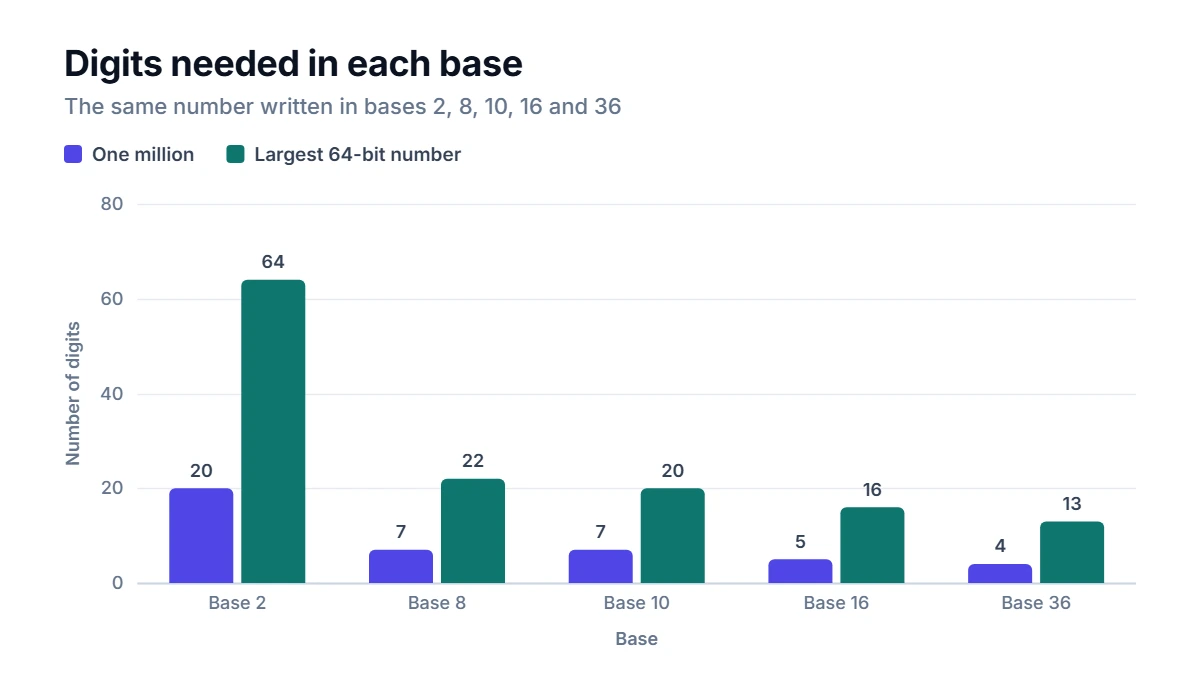
That is why base 36 is popular for short codes in links and order numbers: it packs a large number into a few characters.
How to use the Number Base Converter
The Number Base Converter handles any base from 2 to 36:
- Type a whole number. You can group digits with spaces or underscores, and use the prefixes 0b, 0o or 0x when they match the base you choose.
- Choose the From base and the To base.
- Press Convert.
The result shows your number in binary, octal, decimal and hexadecimal at once, plus your chosen base. The details panel shows the repeated divisions, so you can follow the working step by step. It uses exact big-integer arithmetic, so even numbers far larger than 64 bits convert without rounding.
Common mistakes
- Reading the remainders in the wrong order. The first remainder is the rightmost digit. Read from the last division back to the first.
- Using a digit that the base does not have. There is no 8 in octal and no 2 in binary. If you see one, the number is in a different base.
- Grouping bits from the left. When converting binary to hex or octal, always start grouping from the right and pad the leftmost group with zeros if needed.
- Confusing 0b with a hex digit. In base 16, "0b101" is not binary; B is a valid hex digit, so it reads as 0, B, 1, 0, 1.
- Expecting a negative number in binary to look like computer memory. Computers store negative integers in two's complement with a fixed width. A converter shows -42 as -101010, a minus sign plus the size.
FAQ
Why do computers use binary instead of decimal?
Electronic circuits are simplest and most reliable when each part has just two states, such as on and off or high and low voltage. Two states map directly onto the digits 0 and 1.
What are hex color codes?
A color code such as #4F46E5 is three hexadecimal pairs for red, green and blue. Each pair runs from 00 to FF, which is 0 to 255 in decimal. So 4F is 79 red, 46 is 70 green and E5 is 229 blue.
Can fractions be converted between bases?
Yes, but many fractions that are short in one base never end in another. One tenth is 0.1 in decimal but repeats forever in binary, which is why computers sometimes show tiny rounding errors with decimals.
How do I count in binary on my fingers?
Treat each finger as one binary digit, worth 1, 2, 4, 8 and 16 from the thumb outward. A raised finger means 1. With one hand you can count from 0 to 31, and with both hands up to 1,023.
Related tools

Related guides

How to Read and Write Roman Numerals
Roman numerals look like a puzzle, but they follow a few simple rules. Learn a reliable way to read any numeral from left to right, how to write years like 1888 and 2049, and how to spot forms that are not standard.

GB vs GiB: Data Storage Units Explained
Why a 2 TB drive shows about 1.82 TB on your computer, what the difference between GB and GiB really is, and how bits, bytes and internet speeds fit together.

Pressure Units Explained: psi, bar, kPa and More
psi, bar, kPa, millibars, inches of mercury and mmHg all measure the same thing. Learn what each unit means, how to convert between them and why gauge and absolute pressure differ.

How to Convert Volume Units (Metric, US and UK)
Liters, cups, fluid ounces and gallons all link back to the milliliter. Learn the simple two-step method, see worked kitchen and household examples, and avoid the US vs UK trap.